
The emotional impact of being scammed can be brutal. After realizing you’ve lost money, self-blame and “if only” thinking often kick in:
-
- “What if I hadn’t clicked that link?”
- “I should have known better.”
- “I’m so stupid for falling for that.”
the important thing to remember: You're Not Alone!
This happens to a lot of people more often than you think, so don't blame or mistreat yourself over fraud.
recent fraud trends and why this matters more than ever
-
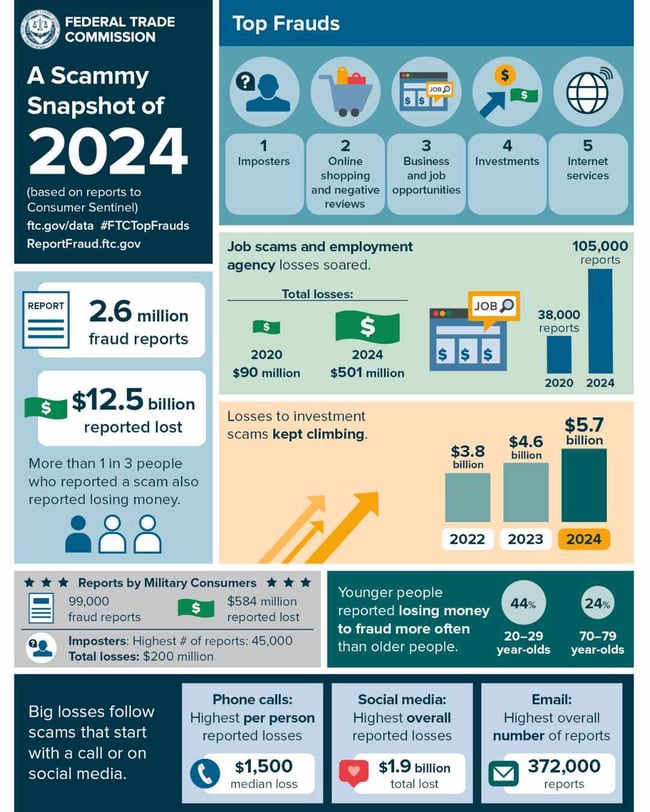
In 2024, consumers reported losing over $12.5 billion to fraud. That's a 25% increase over 2023.
- Imposter or impersonation scams remain among the most common, with $2.95 billion lost in 2024.
- Scams that begin with text messages alone cost consumers $470 million in 2024 , a figure that continues to rise.
- A deeply concerning new vector: AI voice-cloning scams, where fraudsters clone a loved one’s voice to demand “emergency” payments. For example, a man was tricked into sending $25,000 after a scammer used artificial intelligence to replicate his son’s voice. Get the full story here >
- Another case: an elderly mother was scammed out of $15,000 after receiving a call in her daughter’s voice, claiming the daughter needed bail money after a car accident. Get the full story here>
- According to the Federal Trade Commission, reports from older adults (60+) of losing $10,000+ to impersonation scams have increased more than fourfold since 2020.
Fraud is evolving, and so must our defenses.
what are some of the most common money scams of 2025?
Here are some of the most prevalent scams now, some of which didn’t exist (or weren’t widespread) in 2022
AI Voice-Cloning / Deepfake Vishing

Task/Gig Scams / “You Pay to Earn” Scenarios

Fake Investment / Crypto Scams
Phishing

Refund / “You’re Owed Money” Scams

Fake Job / Employment Scams
Impersonator / Imposter Scams
what’s a strong indicator of a money scam?
- Urgency + Threats: “You’ll be arrested,” “Fine will double,” “Your account will close tonight.” Scammers rush you so you don’t think.
- Requesting Unusual Payment Methods: Asking for wire transfers, cryptocurrency, gift cards, reloadable cards, or peer-to-peer apps (like Zelle, Venmo, CashApp).
- Requests for Remote Access: “Install this remote software so we can fix your computer.”
- Pressure to Keep It Secret: “Don’t tell your family,” “This is confidential.
- Caller claims to be from a well-known company or government body, but contact info doesn’t match official channels.
- Too Good to Be True: “Double your money in 48 hours,” “100% safe investment.”
- Mismatch between name and number or email domain: e.g. email from “@gmail.com” claiming to be your bank.
- Voice anomalies in a call: small delays, odd pauses, over-controlled tone, unnatural inflection (possible deepfake).
- Requests for personal data in strange contexts: For example, any unsolicited request for SSN, passwords, PINs, one-time codes, or banking details.
- Money for a promise of something, like debt consolidation, assistance with obtaining a mortgage, etc. Legitimate services will provide you with the product immediately.
- The government needs your social security and banking account information. The federal and local governments will not use email, phone calls, or text messages to ask you for this information. EVER.
- Receiving calls and texts asking for personal information and indicating your account is locked. Unless you've activated your financial institution's bank with a text messaging feature, your institution should not contact you asking for your personal. At Skyla, we will never call and ask for your personal information!
- Direct message on social media from someone you know about a quick money opportunity. This is common on social media like Instagram and Facebook. If you receive a message from someone you may know about a money opportunity, contact them directly by calling. Scammers like to hack accounts and DM people offering money opportunities, requesting your personal information.
a good rule of thumb - if it sounds too good to be true, it probably is! |
what should i do if i see a money scam in action?
- STOP! Stop all contact with the scammer. Hang up the phone. Delete the email, text, or social media message. If you see it happening to someone else, tell the other person to do the same. Just don’t respond.
- Don't make any – or any additional – payments. If you are asked to pay, don’t. It’s tempting to stay involved thanks to the promise of receiving money back. But, at the end of the day, it’s a scam. You won’t get anything. Instead, the scammer will take what you have.
- Contact someone. Tell your financial institution if you suspect something strange. They can help by tracking transactions, freezing or closing accounts, and providing you direction in how to try to get your money back, if possible. If you used Western Union or a similar company, contact them to stop payment to the scammer immediately.
- Report the scam to the FTC (1-877-FTC-HELP) or your local authorities. They will tell you who you can contact if you don’t think the FTC is the right organization to contact.
- Tell your friends and family about the scam. Knowledge is power! That way, your friends and family won’t fall victim to the same type of scam.
- If On Social Media: Delete or block suspicious messages or posts. Also, report the fake account or message and change your passwords (especially if you clicked a link)
what are the best practices i should be using when providing my financial information over the internet?
- You should never provide your information to someone you don’t trust. If you feel like it’s a scam or a dangerous website, don’t use it.
- Make sure the website is secure. That can be identified by seeing “HTTPS://” and the lock icon in the address bar. Make sure you recognize the website address. When in doubt, call the customer service number and ask for the correct web address.
- Enable Multi-Factor Authentication (MFA). Where possible, use app-based authenticators (e.g. Google Authenticator, Authy) rather than SMS.
- Use antivirus software on your computer at home. There are several options available. Just remember, you get what you pay for. The free antivirus programs aren’t terrible, but they also aren’t the greatest at protecting you. Go with names you know, like Avast, Norton, or McAfee.
- Look for bad signs. If you see this image below, then you should exit the page immediately.
.png?width=600&name=your%20connection%20is%20not%20private%20remake2%20(1).png)
- Use secure networks. Avoid doing sensitive transactions on public Wi-Fi unless you use a trusted VPN.
- Monitor your accounts and credit report regularly. Watch for unexpected activity or new accounts you didn’t open.
We can’t possibly try to cover every scam scenario and go over the steps to fix each situation. However, if you follow these steps you’ll have a much better chance of keeping your finances safe online. When in doubt, always contact the company you are working with directly. And always feel free to reach out to your financial institution if things seem fishy.
here's what you need to remember
Always double-check that any site you’re using is secure — look for “https://” and the lock icon in the address bar. Avoid clicking random links or attachments, especially from unknown senders or “too good to be true” offers.
On social media, scammers can easily clone a friend’s account or create a fake business profile to look real. If you get a DM or post offering a “quick money opportunity,” don’t engage — report and block the account instead. You can find guides for reporting hacked or fake accounts in Facebook’s Help Center
You can also always read more about Account Security and Identity Theft on the Skyla website. If you have any other questions, feel free to contact our customer service representatives by email, give us a call at 704.375.0183, or visit a branch.